Features
A complete catalogue of what Seek ships with today. Items tagged Coming soon are on the roadmap but not in the current build.
How Seek compares
Seek is the honest overlap of five tools — a commander, a transfer client, a dev tool, a launcher, and a previewer — in one native, free binary. Scroll the table sideways on a narrow screen.
| Feature | Seek | Finder | ForkLift | Path Finder | Raycast |
|---|---|---|---|---|---|
| Dual / multi-pane | ✓ | ✗ | ✓ | ✓ | ✗ |
| Real tabs | ✓ | ✓ | ✓ | ✓ | ✗ |
| SFTP / S3 / WebDAV | ✓ | ✗ | ✓ | ✗ | ✗ |
| Cloud drives (Drive / Dropbox / OneDrive) | ✓ | ✗ | ✓ | ✗ | ✗ |
| Live git status + per-hunk stage | ✓ | ✗ | ✗ | Partial | ✗ |
| Global launcher (⌘⇧Space) | ✓ | ✗ | ✗ | ✗ | ✓ |
| Embedded terminal + history | ✓ | ✗ | ✗ | ✗ | ✗ |
| Clipboard history | ✓ | ✗ | ✗ | ✗ | ✓ |
| Snippets / text expansion | ✓ | ✗ | ✗ | ✗ | ✓ |
| Workspace snapshots | ✓ | ✗ | ✗ | ✗ | ✗ |
| Trash undo log | ✓ | ✗ | ✗ | ✗ | ✗ |
| Inline syntax-highlighted preview | ✓ | Limited | Limited | Limited | ✗ |
| Premium motion (springs, focus glow, toasts) | ✓ | ✗ | ✓ | Partial | ✓ |
| Localised UI (en + ja + es seed) | ✓ | ✓ | ✓ | ✓ | ✓ |
| RTL layout flip (Arabic / Hebrew) | ✓ | ✓ | ✓ | ✗ | Partial |
| Colour-blind-safe git glyphs | ✓ | N/A | ✗ | ✗ | N/A |
| Settings search field | ✓ | ✓ | ✗ | ✗ | ✓ |
| Display-scale knob (Small→XL) | ✓ | ✓ | ✗ | ✓ | ✗ |
| Starter Mode (hide advanced) | ✓ | ✗ | ✗ | ✗ | ✗ |
| Project-scoped command palette | ✓ | ✗ | ✗ | ✗ | ⚠ via extensions |
| Vim-style navigation (j/k/h/l/gg/G) | ✓ | ✗ | ✗ | ✗ | ✗ |
| OAuth progress sheet w/ cancel | ✓ | N/A | ⚠ | N/A | ✓ |
| Smoothed transfer ETA (EWMA) | ✓ | ✓ | ✓ | ✗ | N/A |
| Embedded Neovim editor (⌘⇧E) | ✓ | ✗ | ✗ | ✗ | ✗ |
| Universal Search (⌘⇧K + sigils) | ✓ | ✗ | ✗ | ✗ | ⚠ |
Universal Search content grep (>) | ✓ | ✗ | ✗ | ✗ | ⚠ |
| Native terminal panel splits | ✓ | ✗ | ✗ | ✗ | ✗ |
| tmux session enumeration + attach | ✓ | ✗ | ✗ | ✗ | ✗ |
| Open source | ✓ | ✗ | ✗ | ✗ | ✗ |
| Free | ✓ | ✓ | ✗ | ✗ | Freemium |
Seek is the overlap: it gives you the dual-pane workflow of a commander, the remote protocols of a transfer client, the git fluency of a dev tool, and the launcher / clipboard / snippets stack of a productivity app — in one native, free, open-source binary you can hit from any other app with ⌘⇧Space.
Everything in the box
Grouped by surface. Every item below is in the current build unless tagged Coming soon.
Window
Window & Workspace
- Single, dual, triple, quad pane layouts (Pro mode supports 2–4)
- Up to four panes per window — add or remove from the toolbar any time
- Real tabs per pane: tear-off, drag between panes, restore last session
- ⌘⇧T to reopen the last closed tab
- Per-window sidebar that can be hidden, reordered, and grouped
- Status bar with selection size and active transfers
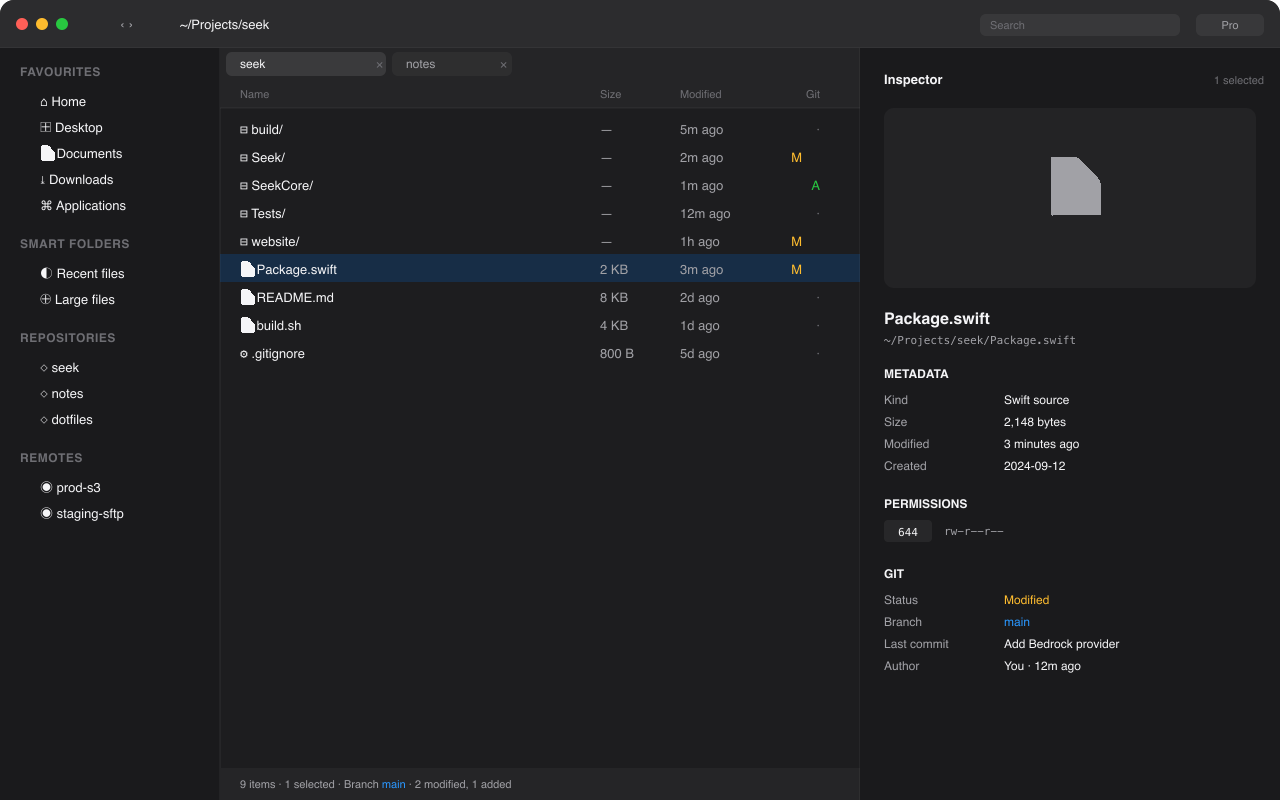
- Inspector panel (Pro): preview, metadata, tags, git status, EXIF
- Three density presets: Comfortable, Cozy, Compact
- Light, dark, auto, and tinted themes
- Per-pane font size
Navigation
Navigation
- Editable address bar (⌘L) — paste paths, drag folders, tokenized breadcrumbs
- "Go to path…" (⌘⇧G) accepting
~, env vars, relative paths - Forward / back history per tab
- Type-to-select in any view; backspace to navigate up
- Open in Terminal (auto-detect Terminal / iTerm)
- Open in VS Code, Xcode, or your default editor (auto-detected)
- Reveal in Finder
Launcher
Command Palette & Global Launcher
- ⌘K to open the in-window command palette
- ⌘⇧Space to open the global launcher from any app — files, folders, apps, recents, favourites, calculator, clipboard history, web search
- ⌃⇧Space to bring the main window forward (or open one if you closed it)
- Fuzzy-matched search across actions, recent paths, favourites, open tabs, remote connections, smart folders, git operations, and installed Mac apps
- Calculator: type
12 * 30 / 7, ⏎ copies the result - Web search:
?<query>opens DuckDuckGo (configurable); bare URLs open directly - Clipboard history: search and re-paste anything from your last 50 copies
- Every menu action and rebindable shortcut is reachable here
- See the dedicated Launcher page for the full pitch
AI · opt-in
AI (optional, opt-in)
- Off by default. Seek works fully without it.
- Four providers: Local (Ollama / llama.cpp auto-detected), OpenAI-compatible, Anthropic, AWS Bedrock
- Read-only verbs only: open / reveal / search / snippet / connection / answer
- Path allowlist: AI can only suggest paths you've already opened (recents + favourites)
- Streamed responses for diff and commit summaries
- No telemetry; direct connection to your provider
- See the dedicated AI page for the breakdown
Files
File Operations
- Cut / Copy / Paste / Move (⌘X = cut)
- Drag-and-drop with file promises across volumes
- Bulk rename with live preview: regex, sequence, find/replace, case change, EXIF-based, prefix/suffix
- New File (⌥⌘N) — type any name, no auto-extension. Power-user friendly:
Makefile,.gitignore,Dockerfileall work as typed - New file from template (md, txt, swift, py, json…) with editable templates folder
- "New folder with selection inside" (⌘⌃N)
- Trash / Empty trash / Secure delete option
- Compare folders (left vs right)
- Sync folders (one-way and two-way) with dry-run preview
- Symlink and hardlink creation with explicit UI
Transfers
Transfer Queue
- Pause, resume, retry, reorder
- Per-transfer bandwidth throttle
- Parallel jobs with configurable concurrency
- Conflict resolution: skip / replace / keep both / merge folders / "always do this"
- Errors don't kill the queue
- Resumable on reconnect for supported protocols
Search
Search
- Spotlight-backed instant search
- In-folder fallback for non-Spotlight locations (e.g. remotes)
- Filter chips: kind, size, modified, tag, content match
- Saved searches → Smart Folders, live-updating
- Search scope: current folder, all open tabs, everywhere
Remote
Remote Protocols
Available now
- SFTP — SSH key + password, agent forwarding, jump hosts via
~/.ssh/config - FTP / FTPS — passive-mode, TLS-on-control-channel, anonymous + authenticated
- SMB / CIFS — Mac, Windows, NAS shares mounted via
mount_smbfs - WebDAV — Nextcloud, ownCloud, generic
- S3 + S3-compatible — AWS, Cloudflare R2, Backblaze B2, MinIO, DigitalOcean Spaces, Wasabi (hand-rolled SigV4 — no AWS SDK dependency)
- Google Drive — Drive v3 list / download / multipart upload (BYO OAuth client)
- Dropbox — API v2 list / download / upload (BYO OAuth client)
- OneDrive — Microsoft Graph list / download / small upload (BYO OAuth client; chunked upload coming for >4 MB files)
Coming soon Roadmap
- AFP / NFS / iSCSI — server-mounted protocols still on the roadmap; needs the same
mount_*shell-out pattern SMB uses
Across all protocols: saved connections in Keychain, sync-to-local-cache mode for offline browsing, per-connection bandwidth throttle. S3 also gets a bucket / region picker and presigned URL generator.
Archives
Archives
- Read / extract: zip, tar, tar.gz, tar.bz2, tar.xz, rar, 7z, gz, bz2, xz
- Create: zip, tar.gz, 7z
- Browse archives inline like a folder (read-only)
- Add to existing archive (where format allows)
- Encrypted zip / 7z support
Preview
Quick Look++
- All system Quick Look extensions still work
- Built-in enhanced previews:
- Code with syntax highlighting
- Markdown rendered
- JSON / YAML / TOML pretty-printed
- EXIF / IPTC for images
- Video metadata
- Archive contents
- Hex view fallback
Inspector
Inspector
- Thumbnail or full preview
- Full path with copy button
- Item size + selection total
- Permissions, owner, group
- Tags
- Git status (when applicable)
- EXIF / image metadata
- "Open with" picker
Power
Bulk & Power
- Multi-file metadata edit (tags, comments, dates)
- Permissions UI (chmod-style + checkboxes), recursive option
- Calculate folder size in the background, cancellable
- Hidden files toggle (⌘⇧.)
- Show file extensions always
- Duplicate finder (name, size+name, content hash)
- Select Same… menu — multi-select every PDF, .swift, image, or all-folders/files-only in the current view with one click
- Clipboard history sheet (⇧⌘]) — recent text on your pasteboard, capped at 50, searchable
- Snippets / text expansion —
/today,/now,/cwd,/clipand your own;<date>,<time>,<clip>,<cwd>,<home>placeholders expand on Tab inside the terminal - Workspace snapshots — save a named pane layout (URLs, active tab, view styles, inspector state) and restore it from the command palette
- Trash History — every Seek-driven recycle is logged with size + timestamp; one-click recover
- Pin Tab — pinned tabs survive ⌘W and show a lock icon; unpin from the right-click menu
- Jump to project root — breadcrumb context menu walks up to the nearest
.git,Package.swift,Cargo.toml,go.mod,pyproject.toml,package.json,pom.xml,build.gradle,Gemfile,composer.json, ormix.exs
Editor
Editor & power tools
seekcommand-line tool — drops a tiny binary on$PATHso you can runseek .to open the current directory in Seek,seek file.swiftto open a file in the embedded Neovim editor,seek -t path/for a new tab, orseek -p path/for a new pane. Install from Settings → Tools & Integration → "seekCommand".- Embedded Neovim editor — ⌘⇧E on any file opens a real
nvim --embedsession in a sheet. Speaks msgpack-RPC over stdin/stdout;:wq<CR>saves and closes. Honours your~/.config/nvim/init.lua. Requiresbrew install neovim(Seek detects it on PATH). - Universal Search — ⌘⇧K opens a single search field that fans out across files, settings, project actions, git refs, recents, calculator, and web. Sigils scope a query:
?settings ·>content grep ·!actions ·:git refs ·~recents ·=calculator ·/path. - Native terminal panel splits — vim-style ⌃⇧hjkl pane navigation with ⌃⇧D / ⌃⇧S splits and ⌃⇧Z zoom. Each pane is its own pty; no real tmux involved (you can still run
tmuxinside any pane). - tmux integration — sidebar lists every running tmux session with attached/detached state. Click attaches in a new terminal tab via real
tmux attach-session.
Terminal
Embedded Terminal
- One terminal panel per window, multi-tab, CWD-aware
- Persistent shell history — JSONL log under
~/Library/Caches/Seek/shell_history.jsonlsurvives restarts - Frecency-ranked Ctrl+R reverse search (recency × frequency × CWD-match) over the persistent log
- Up / Down with prefix — like zsh: type "git " then press Up to cycle only your past
git …commands - Tab to expand snippets — your custom triggers + the built-in placeholders
- Pop-out to your real terminal (Terminal.app / iTerm / Ghostty) — guarded if you have unsent input
Git
Git Integration
- Repo header strip per folder: branch, ahead/behind, dirty indicator, fetch button
- Per-row status: M / A / D / R / ? / ! / U with color-coded gutter
- Dimmed
.gitignored files (toggleable) - Stash count badge on repo folders
Right-click & inspector actions
- Stage / unstage / discard / restore
- Commit with subject + body, sign-off, GPG sign
- Amend last commit (with safety guard if pushed)
- Stash push / pop / apply / drop
- Branch switch / create / delete / rename
- Pull / push / fetch with remote picker
- Merge / rebase with abort and continue UI
- Cherry-pick, revert, reset (soft / mixed / hard)
- Tag create / delete / push
- Blame view in Quick Look — line-by-line, hover for commit + author
- History view (graph, filterable, search) for file or folder
- Diff in Quick Look: file, staged-vs-working, two arbitrary refs, side-by-side or unified
- Per-hunk Stage / Unstage / Discard — toggle the Hunks panel in any diff and operate one hunk at a time, no
git add -pround-trip - Inline conflict viewer when merge markers detected
- "Open in external mergetool" hook (BBEdit, Kaleidoscope, FileMerge, VS Code)
- Sidebar group "Repos" auto-discovered
- Smart folder: "Files with uncommitted changes across all repos"
- Every git action reachable via command palette
Tags
Tags
- Read/write Spotlight tags (Finder-compatible)
- Bulk tag operations
- Tag autocomplete in inspector
- Tag-based smart folders
Customize
Customization
- Customizable columns per view, with reordering
- Per-folder remembered settings (sort, view, columns)
- Toolbar customization (drag items in/out)
- Sidebar item ordering and grouping
- Theming: light / dark / auto, accent color, optional Pro colorways
- Rebindable keyboard shortcuts
Automation
Scripting & Automation
- AppleScript dictionary: open path, list selection, get metadata, run transfer, switch mode (available now)
- Shortcuts.app actions for the same (available now)
seek://URL scheme for opening paths and triggering commands
Access
Accessibility
- Full VoiceOver support — every chrome element and file row labeled, walkthrough modal traps focus and announces step transitions
- Keyboard navigation everywhere; opt-in Vim mode (j/k/h/l/gg/G) for power users
- Reduced motion respected — every spring transition collapses to identity
- Differentiate Without Color respected — git status switches to a high-contrast monochrome palette with a per-status glyph (pencil / plus / minus / arrow) augmenting the letter
- Persistent toasts toggle — disable auto-dismiss for VoiceOver users and slow readers
- Thicker focus ring opt-in — replaces the soft accent halo with a 3px solid stroke for users with low vision or focus-tracking difficulty
- Display Scale — Small / Standard / Large / Extra Large multiplier on every font size
- Starter Mode — hide advanced surfaces (Repos, Tools, Cloud Drives, Updates) so brand-new users aren't overwhelmed
- Switch Control friendly
i18n
Internationalisation
- Catalog-backed string resolution (
Localizable.xcstrings) - English source language; Japanese and Spanish seeded for high-traffic strings (walkthrough copy, common buttons, sidebar/toolbar labels)
- Right-to-left layout flip for Arabic / Hebrew / Persian / Urdu / Yiddish — applied at the window root via
seekDirectionAware() - Strings without a locale-specific translation fall back to English at runtime — partial localisation ships safely
Trust
Trust & Distribution
- Free, no account required
- Distributed via Homebrew cask (
brew install --cask) and direct DMG - No telemetry by default; opt-in crash reporting only
- Sparkle auto-updates with EdDSA-signed appcast
- macOS 14 Sonoma and newer; Apple Silicon and Intel